The 8 best digital wardrobe apps in 2026 (ranked and compared)
A digital wardrobe app turns the clothes you already own into a searchable, organised version of your real closet, so you can plan outfits from your actual pieces, wear what you have more often and buy less on impulse. This guide ranks the eight best digital wardrobe apps in 2026, with pros, cons, pricing and platforms for each, so you can pick the one that fits how you think about your clothes.
The short answer. It depends on what you want from the app. Whering is the best fully free closet, Stylebook keeps everything on your own device for a one-off $4.99, Indyx adds real human stylists, Cladwell is the fastest way into a capsule, and Acloset does the most automatic cataloguing. If you want to style your clothes by chatting in ChatGPT or Claude, that is where Modebase fits. We make Modebase, so we say where it stands further down. Pick the category, not the rank.
Which digital wardrobe app is right for you?
- Best for automatic AI cataloguing: Acloset, which tags as you add.
- Best with no subscription: Stylebook, $4.99 once and yours for good, on iPhone only.
- Best free digital wardrobe app: Whering, now free with no paid tier at all.
- Best free newcomer: Alta, the most polished free app right now.
- Best for human styling and resale: Indyx, where real stylists work with your pieces.
- Best budget all-rounder: Smart Closet, free with a $0.99 a month Pro tier.
- Best for a capsule wardrobe: Cladwell, and the fastest setup of any app here.
- Best for styling inside ChatGPT or Claude: Modebase.
How we evaluated these apps
We judged every app on the six things that decide whether a digital wardrobe actually gets used, rather than just downloaded and abandoned:
- Cataloguing effort: how long it takes to get your clothes in, and whether the app does the work for you (auto cut-outs, AI tagging, batch photos) or leaves it to you.
- Styling quality: whether the outfit suggestions are genuinely wearable, and whether they consider weather, the occasion and what you have already worn.
- Do you actually see your clothes: whether the app shows your real pieces as images, or only lists them as text.
- Tracking and analytics: wear counts, cost-per-wear, and surfacing the pieces you never reach for.
- Price and value: the real cost once your closet is a realistic size, not just the headline free tier.
- Data portability: whether you can export your wardrobe and take it with you if the app ever shuts down.
For a second opinion, Beauty AI publishes a comparison of eleven wardrobe apps arranged by the job you want done rather than by rank, which is a genuinely useful way to shortlist. Read it with the same caveat we ask you to hold us to: its author makes one of the apps in it and says so on the page, it compares published product information rather than hands-on testing, and it does not cover Modebase.
Pricing and features were checked on 16 September 2026 against each app's own website and store listing.
A note on where we stand
We make Modebase, so read this list with that in mind. It is not ranked first. It appears once, in the category where it is strongest: styling the clothes you own by chatting in ChatGPT or Claude, which the other apps here do not do. Where another app is better at something, we say so. Whering is a better free closet, and more social. Stylebook keeps your wardrobe on your own device and asks for no subscription. Indyx gives you a real human stylist, which no algorithm replaces. Cladwell gets you dressed from a capsule faster. Pick the category, not the rank.
1. Whering: best free digital wardrobe app
Whering is one of the most recognisable names in the digital wardrobe space, and its message is refreshingly focused: digitise your closet, then wear it more. You upload your clothes, the app removes the backgrounds automatically, and you get a clean visual grid of everything you own. From there it suggests outfit combinations, tracks how much you actually wear each piece, and leans hard into sustainability, nudging you to rewear and rediscover rather than buy new.
Key features
- Photo upload with automatic background removal, plus a large item database
- Dress Me outfit shuffle and event-based outfit planning
- Wardrobe analytics: cost-per-wear, wear rate, colour palette
- Social styling: view friends' closets and share outfits for feedback
- Travel packing lists, wishlists and moodboards
Pros
- Genuinely free, with a large user base
- Strong analytics that reveal what you actually wear
- Automatic background removal makes cataloguing fast
Cons
- The social-first feel is not for everyone
- Heavy AI styling use has been metered in the past, so check before you rely on it
Best for: Style-curious users who want a free, social, analytics-driven closet.
Pricing: Free. Whering's own FAQ states the app is completely free to use; the £9.99/month Premium tier it once sold is gone. Platforms: iOS, Android. App Store · Google Play
2. Acloset: best for automatic AI cataloguing
Acloset sets out to make building a digital wardrobe as painless as possible, and its main promise is smart, fast cataloguing. AI-powered item recognition helps sort and tag your clothes as you add them, so the tedious part of digitising a closet goes quicker. Once your items are in, you can generate outfit recommendations based on weather, mood and occasion, and even import pieces directly from retailers.
Key features
- AI clothing recognition and organisation from photos
- Import items from retailers such as Amazon, Zara and Shein
- AI outfit recommendations by schedule, weather, mood and colour
- Weather-based travel packing and daily outfit tracking
- Chrome extension for saving items while you shop
Pros
- Strong AI automation removes most of the manual work
- Handy Chrome extension for capturing pieces as you browse
- Large and active user base
Cons
- The free tier is capped at 100 items
- AI tagging occasionally needs manual correction
Best for: Users who want AI to do the heavy lifting of organising and styling.
Pricing: Free up to 100 items, with ads. Paid tiers scale with closet size, roughly $3.99 to $24.99 a month. Platforms: iOS, Android, Chrome. Google Play
3. Indyx: best for human styling and resale
Indyx aims to sit where the digital closet meets real human styling. At its core it is a wardrobe app: you photograph and organise everything you own into a clean digital closet with automatic background removal. What defines it is the bridge to professional stylists who can work with your actual pieces to build looks and give feedback, plus a zero-commission resale marketplace for the clothes you are ready to move on from.
Key features
- Wardrobe cataloguing with automatic background removal
- Unlimited outfit creation and calendar-based planning
- Cost-per-wear tracking and closet sharing
- Optional professional archivist cataloguing service
- Optional personal styling and a zero-commission resale marketplace
Pros
- Free core app with a polished experience
- Access to real human stylists, not only an algorithm
- Resale marketplace charges no commission
Cons
- The best features (archivist and styling) cost extra
- Smaller catalogue and community than some rivals
Best for: People who want a polished closet plus optional human styling and resale.
Pricing: Free core app. Insider membership is $12.99 a month or $74.99 a year. Styling is priced by each stylist, from about $25 a month or $110 one-off, and a custom lookbook starts around $150. The Archivist cataloguing service is $295 for 100 items, plus $2 an item beyond that. Platforms: iOS, Android. App Store · Google Play
4. Stylebook: best for power users who want control
Stylebook is the veteran of the category, fourteen years old and still going, and its appeal is that you buy it once and own it. You log every item, build outfits by hand, plan a calendar, and get cost-per-wear and neglected-piece numbers out of the other end. The trade is effort: nothing is automatic here, every outfit is one you assemble yourself, and the numbers are only as good as your own logging, which is where most people quietly stop. Worth it if you want no subscription and you are on an iPhone, since it has never come to Android.
Key features
- Build a digital closet from your own photos
- Outfit creation and calendar-based outfit planning
- Packing lists for travel
- Wardrobe statistics and cost-per-wear insights
- Style inspiration boards and personal sizing records
Pros
- Deep, granular control over every item and outfit
- One-time purchase with no ongoing subscription
- Long-established and well reviewed in major press
Cons
- Available on iOS and iPad only
- Manual photo preparation is time-consuming
Best for: Detail-oriented users who want maximum control and no subscription.
Pricing: Paid, one-time $4.99. Platforms: iOS only. App Store
5. Cladwell: best for capsule and minimalist wardrobes
Cladwell approaches the wardrobe from a "less but better" philosophy. Rather than cataloguing hundreds of items, its message centres on the capsule wardrobe: identify the pieces that truly work together and get daily outfit suggestions built around them, factoring in your local weather. It is ideal for the person who feels overwhelmed by too much choice and wants a smaller, more intentional closet that still delivers a fresh outfit every morning.
Key features
- More than 35 customisable capsule-wardrobe templates
- Daily outfits personalised to your local weather
- Cost-per-wear and style analytics
- Add items via camera, screenshots or URL with background removal
- Multiple capsules for season, activity or travel
Pros
- Excellent for a capsule or minimalist approach
- Weather-aware daily "what to wear" suggestions
- Low monthly price
Cons
- Full features require a subscription
- Little social or resale functionality
Best for: Minimalists who want daily guidance from a capsule wardrobe.
Pricing: Freemium. $4.99 a month for the outfit planner and unlimited items, with a higher tier around $7.99 for analytics and mini-capsules. Platforms: iOS, Android. App Store · Google Play
6. Modebase: best for styling inside ChatGPT or Claude
Here is the problem most of these apps are trying to solve, and the one this list should really be judged on. You own a lot of clothes. You wear about a fifth of them. You stand in front of the open wardrobe on a Tuesday feeling like you have nothing, buy another black jumper in the hope it helps, and the good pieces at the back keep not getting worn because you forget they are there.
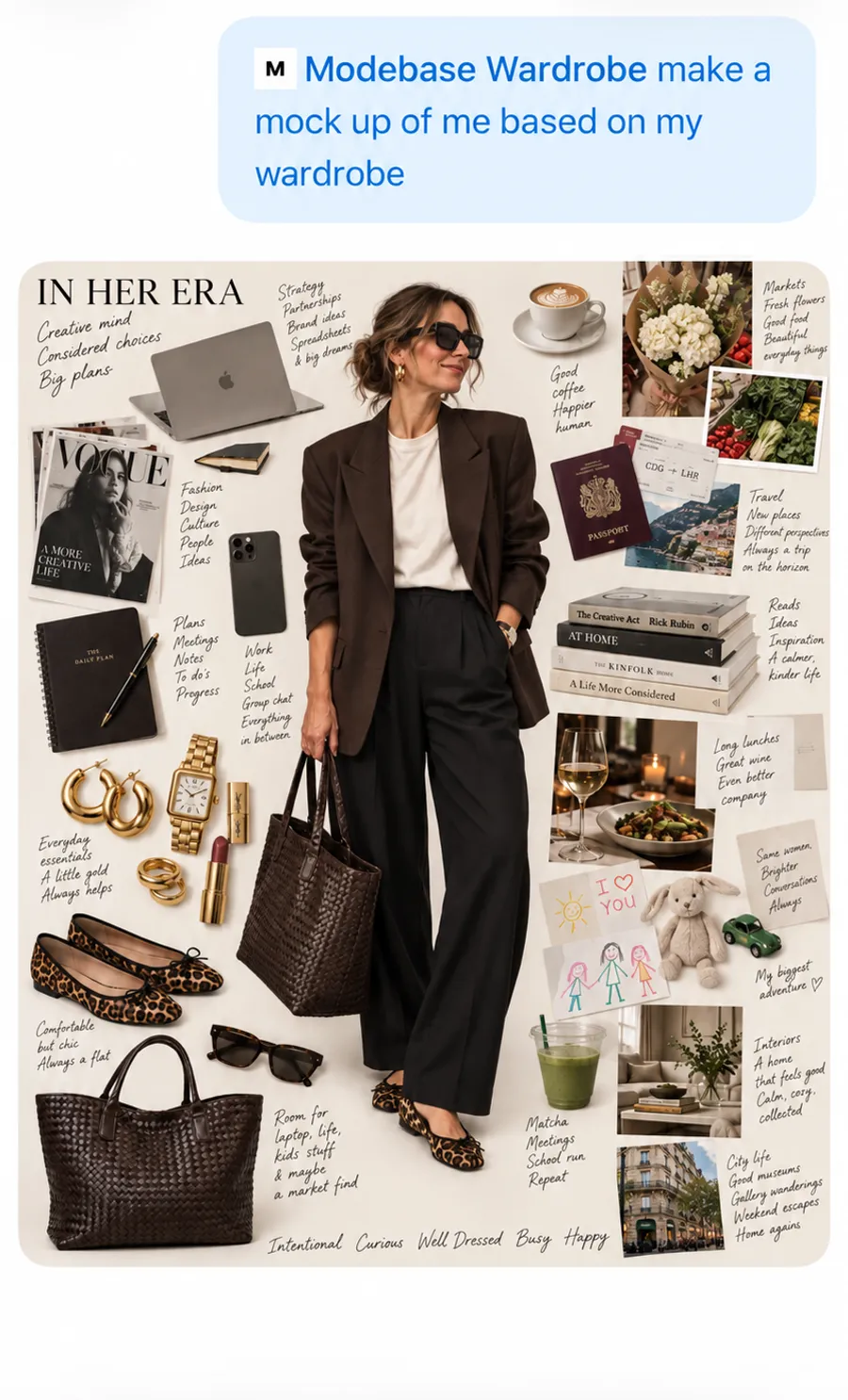
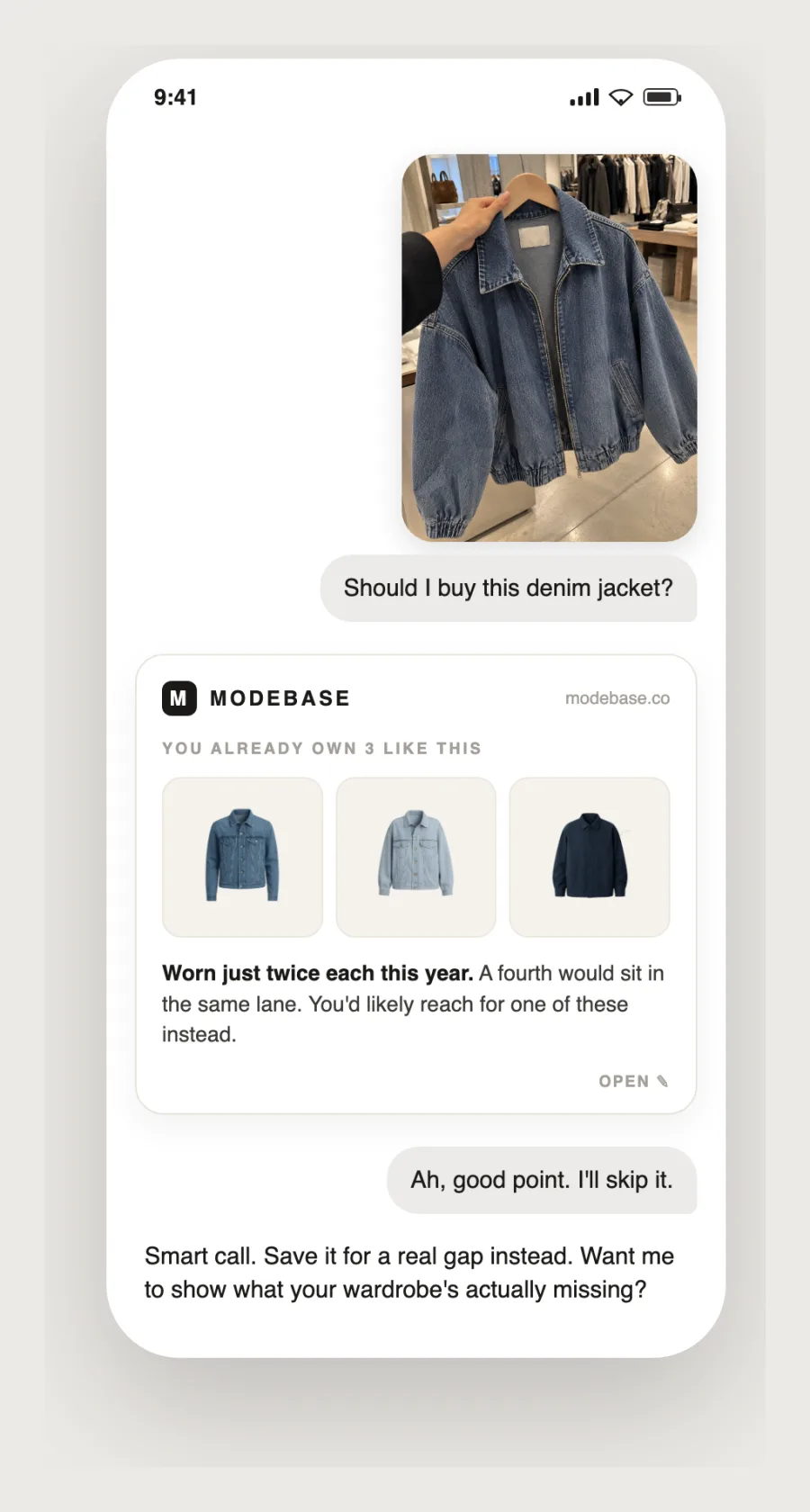
Modebase is the odd one out here, because it is more than an app. It is a smart wardrobe: every garment properly recorded, with its colour, cut, fabric, how dressy it is and what you have said about it, sitting behind the chat you already have open. There is a website for looking after it, but the using happens in ChatGPT or Claude.
Key features
- Outfits, packing lists and capsules from the clothes you own, asked for in plain language
- Your pieces shown as real cut-out images in the chat, not described in words
- Build the wardrobe from photos you already have, several garments read out of each one, each returned as a polished cut-out
- Anything you say about a piece is saved onto it, and your style profile builds as you go
- Lookbooks, capsules, wardrobe audits, gaps, what you have not worn, and resale flagging, all from the chat
- Works in ChatGPT and Claude, and exports as a spreadsheet plus every cut-out image
Pros
- Useful from a dozen pieces, so the cataloguing spreads out instead of costing you a Sunday
- You see the actual garments, which is the difference between reading advice and picking an outfit
- What you tell it about a piece sticks to that piece, for as long as you own it
- Your wardrobe is yours to export and take elsewhere, not locked inside one app
Cons
- You still have to build the wardrobe. However you spread it out, every piece has to get in there somehow
- Newer and smaller than the long-established closet apps
Best for: Anyone who wants to style the clothes they own by asking in plain language, and would rather build the wardrobe gradually than lose a Sunday to it.
Pricing: Freemium. Free to try, with no card. Past that, a membership: Wardrobe at US$9.99 a month (US$115 a year) holds up to 500 pieces, and Collection at US$24.99 a month (US$249 a year) holds up to 1,000 with the deeper wardrobe intelligence. Where it lives: on the web for managing your wardrobe, and inside ChatGPT or Claude for using it. Nothing to download.
One app that left the category
Save Your Wardrobe still turns up on 2026 roundups as a consumer wardrobe app. It is not one any more.
The company now sells an end-to-end aftersales platform to brands, covering repairs, alterations, warranties and logistics, with LVMH and Zalando among the names on its site. There is no consumer closet app at the centre of it. It was genuinely good at garment care when it was pointed at individuals, and that is not what it is pointed at now.
We have taken it out of the rankings rather than quietly leaving it in. If a comparison list still recommends it to individuals, that list has not been checked recently, which is worth knowing about the list as much as about the app.
7. Smart Closet: best budget all-rounder
Smart Closet rounds out the list as a flexible, approachable all-rounder. Its aim is simply to give you a straightforward digital version of your wardrobe without a steep learning curve. You catalogue your clothes, create and plan outfits, pack for trips, and keep a visual record of what you own. It does not chase a single specialist niche, which is precisely its appeal for anyone who just wants a clean, easy digital closet to get started with.
Key features
- Import clothes from brand catalogues or add your own photos
- One-click background removal
- Outfit creation plus rule-based randomised looks
- Calendar outfit planning with daily notifications
- Closet statistics and support for multiple closets
Pros
- Free to start, and Pro costs about a dollar a month
- Flexible outfit-generation rules
- Supports multiple closets on one device
Cons
- Cloud backup and sync require the Pro subscription
- The interface feels dated to some users
Best for: Users wanting an affordable, flexible closet organiser.
Pricing: Free to download with in-app purchases. Pro is $0.99 a month or $9.99 a year, which buys backup and sync across devices. Platforms: iOS, Android. App Store · Google Play
8. Alta: best of the new free wardrobe apps
Alta is the newcomer that earned its way into the main list rather than the watch list below. It was named one of TIME's Best Inventions of 2025 and has been covered by Vogue, ELLE and WWD, and unlike most of the field it is genuinely free, with no ads and no cap on how many items you add, funded by shopping affiliate revenue rather than a subscription.
What sets it apart is polish. It builds outfits that read the weather and your calendar, offers a virtual try-on on an avatar made to look like you, and its "prettify" step turns your ordinary phone photos into clean, product-style cut-outs so the closet looks like a shop rather than a camera roll. It also tracks cost per wear automatically, without you logging a thing.
Key features
- Genuinely free, with no ads and no item cap
- Weather- and calendar-aware AI outfit suggestions
- Virtual try-on on an avatar built to resemble you
- "Prettify" clean-up that turns snapshots into product-style images
- Automatic cost-per-wear tracking
Pros
- The most polished free app in the category right now
- No paywall on the basics, and no limit on items
- Fast-moving, with real press behind it
Cons
- Younger than the established names, so the track record is short
- Affiliate funding means shopping is part of the experience
- Lives in its own app, not inside the assistant you already use
Best for: Anyone who wants the most polished free digital wardrobe today.
Pricing: Free, funded by shopping affiliate revenue. Platforms: iOS, Android.
Best digital wardrobe apps at a glance
| App | Best for | Price | Platforms |
|---|---|---|---|
| Whering | Free, social, analytics-driven closet | Free | iOS, Android |
| Acloset | AI-powered automatic cataloguing | Free to 100 items, from £3.99/mo | iOS, Android, Chrome |
| Indyx | Digital closet plus human stylists and resale | Free core, $12.99/mo | iOS, Android |
| Stylebook | Maximum control with no subscription | $4.99 once | iOS only |
| Cladwell | Capsule wardrobes and daily "what to wear" | From $4.99/mo | iOS, Android |
| Modebase | Styling the clothes you own by chatting in ChatGPT | Free to try | Web, ChatGPT connector |
| Smart Closet | Affordable, flexible all-rounder | Free, Pro $0.99/mo | iOS, Android |
| Alta | The most polished free app right now | Free | iOS, Android |
Prices checked 16 September 2026 against each app's own site and store listing. They change, so look before you pay.
Digital wardrobe apps compared, feature by feature
| App | Auto cut-outs | AI outfit ideas | Wear tracking | Outfit calendar | In ChatGPT / Claude | Free tier |
|---|---|---|---|---|---|---|
| Whering | Yes | Yes | Yes | Yes | No | Yes |
| Acloset | Yes | Yes | Yes | Yes | No | Yes |
| Indyx | Yes | Human | Yes | Yes | No | Yes |
| Stylebook | Manual | No | Yes | Yes | No | No |
| Cladwell | Yes | Yes | Yes | Yes | No | Yes |
| Modebase | Yes | Yes | Yes | Yes | Yes | Yes |
| Smart Closet | Yes | Yes | Yes | Yes | No | Yes |
| Alta | Yes | Yes | Yes | Yes | No | Yes |
"Auto cut-outs" means the app removes photo backgrounds for you rather than making you do it by hand. "AI outfit ideas" marks apps that suggest looks for you, as opposed to Indyx, whose styling is done by real people, and Stylebook, where you build every outfit yourself. "In ChatGPT / Claude" is whether the wardrobe can be used from inside an AI assistant, which today only Modebase does. For more on that, see which wardrobe apps actually work with ChatGPT.
Digital wardrobe apps compared by use case
| App | Best use case | Strongest angle | Main limitation |
|---|---|---|---|
| Whering | Building a free visual closet | Analytics and sustainability | Social-first feel |
| Acloset | Fast set-up | AI auto-cataloguing | 100-item free cap |
| Indyx | Closet plus expert help | Human stylists and resale | Add-ons cost extra |
| Stylebook | Deep organisation | Stored on your own device | iOS only |
| Cladwell | Smaller, intentional wardrobe | Capsules and weather | Needs subscription |
| Modebase | Getting dressed from your own closet | A smart wardrobe you own, styled by chatting in ChatGPT | Newer to the market |
| Smart Closet | An easy first closet app | Simplicity and price | Sync behind Pro |
| Alta | A polished free closet | Free, weather- and calendar-aware AI | Newer, affiliate-funded |
How to choose the right digital wardrobe app
Start by deciding what you actually want the app to do. If a clean, free visual catalogue with useful analytics matters most, Whering is the natural pick. If the effort of adding clothes has stopped you before, Acloset's AI cataloguing removes most of that friction. If you want a real person guiding your looks or a way to resell, Indyx is built for that. If you would rather pay once than subscribe, and you do not mind building each outfit yourself, Stylebook is the one to buy. Minimalists who want a smaller, smarter wardrobe will get the most from Cladwell. If you want to style the clothes you own by chatting in plain language, and would rather have a smart wardrobe behind your assistant than another app to open, Modebase is built for that. If keeping clothes in great condition is your priority, none of the apps here do that job any more. And if you simply want an easy, affordable starting point, Smart Closet does the job.
The best digital wardrobe app is ultimately the one you will keep updated, because an out-of-date closet helps no one. Pick the message that matches how you think about your clothes, then commit to photographing your wardrobe once so the app can start working for you.
Where the intelligence lives: inside the app, or in your chat
Every app on this list says it has AI. In 2026 that tells you very little, because they all do. The question worth asking is where the intelligence lives, and there are only two answers.
AI inside the app. The app calls a model behind the scenes and shows suggestions in its own interface. This is most of the category, and some of it is done beautifully. The catch is that the styling only happens in the place you have to go to, and going there is a decision you have to make before you have had coffee.
A wardrobe your assistant can reach. The clothes live in a database that ChatGPT or Claude can query directly. You do not open a wardrobe app. You ask, in the chat you already have open, and the answer is built from what is actually in your cupboard. Today only Modebase works this way. Both approaches are legitimate and they suit different people, but a list that treats them as the same product hides the one difference that decides whether you keep using it.
Why most wardrobe inventories die in week three
Tracking what you own sounds simple, and most inventories are abandoned within a month. Understanding why predicts your outcome better than any feature list.
- Setup is brutal. Photographing, cropping and tagging 150 garments is an unpleasant evening, and most people quit around item 40. A half-finished inventory is worse than none, because you cannot trust any answer it gives.
- Maintenance is worse. The catalogue is a one-off cost. The wear log is a daily one, and small daily tasks with no immediate payoff are the ones people stop doing.
- The payoff arrives too late. Cost per wear only becomes interesting after months of data.
The apps that survive either remove the setup cost, remove the logging cost, or give you something useful on day one. To build an inventory that lasts in any of them:
- Do not catalogue everything. Start with what you wore in the last month, usually 30 to 50 items.
- Photograph in one place, once. Same spot, same light, and batch it.
- Log wears for six weeks before you judge it. That is roughly when the patterns show up.
- Add new things when they arrive. One item at the point of purchase is trivial. Thirty in a catch-up session never happens.
For the maths behind the numbers, see how to calculate cost per wear.
What happens to your data if you stop paying
Ask whether you can get your wardrobe out. It is a dull question and the one that matters most, because closet apps close. A wardrobe you cannot export was always someone else's. We cover what to do when it happens in your digital wardrobe app shut down, now what.
Three newer names worth knowing
The eight above are the established picks. These three have arrived recently, and any 2026 list that ignores them is out of date. We have not lived in them the way we have with the eight, so treat this as a pointer rather than a verdict.
Fits. The nicest interface of any of them, and generous: unlimited items, unlimited outfits and unlimited background removal on the free tier, no ads. Its Dressing Room lets you swipe pieces onto a mannequin. Fits Pro adds unlimited AI styling chat, deeper analytics and monthly credits for try-on, though the Pro price is not published on its own help pages. iOS.
Nouva. Styling first, closet second. Free covers 30 items and three outfits a week, which is a real trial rather than a teaser, and Plus runs about £7.99 a month for 150 items and thirty outfits a week. iOS and Android.
Aurelle. The newest and the priciest, launched in 2026 with no free tier: Basic around €3.99 a month, Premium €14.99, Pro €24.99, each with a trial. It leans hardest on styling intelligence, reading weather, calendar and body shape together. Worth watching rather than committing to, until the pricing settles.
Prices for these four were checked in September 2026 and are moving quickly, which is the nature of a category with this many new entrants.
Where these apps are heading
The direction is fairly clear. Cataloguing your clothes is no longer the product, because every app here does it. The value is moving to what the catalogue makes possible, mainly resale and shopping. This is our reading of public announcements, not inside knowledge, so treat it as a view rather than a forecast.
Whering raised a $7 million seed round in July 2026 led by eBay Ventures and the Google AI Futures Fund, and reports more than 10 million users. The two investors point in two directions: resale on one side, and AI styling and virtual try-on on the other. It has not said how it will earn money beyond the free app.
Alta raised an $11 million seed round in 2025 led by Menlo Ventures, with Aglaé Ventures, the fund backed by the Arnault family, taking part. It leans hardest towards shopping. In February 2026 it partnered with the brand Public School to put a "Style with Alta" try-on option on the brand's own product pages, and says it plans similar integrations with other brands. A September 2026 press release, quoted by CB Insights, says its models also power styling and try-on for publicly traded retailers. That points towards supplying tools to brands, with the consumer app as the way in.
Indyx goes the other way, towards people rather than software: human stylists, in-home cataloguing and a resale marketplace. Acloset is moving towards shopping too, with its Chrome extension for saving items from any store. Cladwell still sells a simple capsule wardrobe subscription.
Two patterns follow. AI outfit suggestions are becoming a standard feature, so the lasting asset is the record of what you own and wear. And the money tends to come from what you buy and sell, which is worth knowing when you decide where to keep your wardrobe. It is a good reason to choose an app that lets you export your data. Google has also reportedly closed its standalone Doppl try-on app, which suggests virtual try-on is turning into a built-in feature rather than a product.
Frequently asked questions
What is the best digital wardrobe app in 2026?
It depends on the job. Whering is the strongest free closet, Acloset is the fastest to set up, Indyx is best for human help, Stylebook is the one to buy outright, and Cladwell is best for capsules. Modebase suits people who want to style the clothes they own by chatting in ChatGPT or Claude.
Is there a free digital wardrobe app?
Yes. Whering and Pureple both offer strong free experiences, and Acloset, Indyx and Cladwell offer free tiers with paid upgrades. Modebase is free to start, and what sets it apart is the output: beautiful cut-outs of your own clothes, ready to use in the chat you already use, ChatGPT or Claude. Free tiers sometimes cap the number of items you can add.
How do digital wardrobe apps work?
You photograph or import your clothes, the app removes the backgrounds and sorts them into categories, and you then build and plan outfits from your own pieces. Most apps add analytics such as cost-per-wear and suggestions for what to wear.
Are digital wardrobe apps worth it?
If you own more than you wear, yes. A digital wardrobe helps you rediscover forgotten pieces, plan outfits ahead, pack smarter for travel and cut impulse purchases, which usually saves more than any subscription costs.
What is the difference between a digital wardrobe app and an AI stylist app?
A digital wardrobe app focuses on cataloguing and organising the clothes you own. An AI styling app focuses on advice and outfit generation. Modebase sits across both and is neither exactly: it is a smart wardrobe you own, which hands your real pieces and your style profile to using your wardrobe with ChatGPT. Neither kind replaces a stylist.
What is the difference between an app that uses AI and an app that connects to ChatGPT?
An app that uses AI calls a model inside its own interface, so suggestions appear in that app. An app that connects to ChatGPT lets the assistant read your wardrobe, so you get answers about your real clothes in the chat you already use, without opening a wardrobe app.
What is the best app for tracking wardrobe inventory?
The one you will still be using in six months. Stylebook has the most mature cost per wear tracking for a one-off $4.99 on iPhone, Whering is the best free option, Cladwell and Indyx remove the setup effort, and Modebase removes the daily logging because a wear is one sentence in a chat.
How long does it take to catalogue a wardrobe?
Photographing items yourself takes about one to two minutes per garment, so 150 pieces is several hours. Catalogue-matching apps such as Cladwell cut that to around twenty minutes at the cost of precision, and Indyx will do it for you from about $295 per 100 items.
Do digital wardrobe apps help with sustainability?
They can. By showing what you already own and how often you wear it, these apps encourage rewearing over buying. The honest version is simply wearing what you own more often, which is what a wear record makes visible.
Final verdict
There is no single best digital wardrobe app, only the best one for what you want. Whering is the best free choice, Acloset the fastest to set up, Indyx the best for human help, Stylebook the one to buy outright, Cladwell the best for capsules, Smart Closet the friendliest budget option, and Alta the most polished of the free newcomers. If you would rather style your clothes by chatting in ChatGPT or Claude, Modebase is built for that. Pick the one you will keep updated, because an out-of-date closet helps no one.
Related reading
- ChatGPT Wardrobe: how to use your real clothes with ChatGPT. The full guide to the connected-wardrobe approach.
- Which wardrobe apps actually work with ChatGPT. The connector question, app by app.
- You are already using ChatGPT to plan your outfits. Why it forgets your clothes, and the fix.
- Can ChatGPT see my wardrobe? Yes, once you connect one.
- Connect your wardrobe to ChatGPT. Two minutes, free to start.
Editorial disclosure: this comparison is published by Modebase. Modebase is ranked in this list. No competitor paid for inclusion or ranking. App features, pricing and platforms were checked against official App Store and Google Play listings on 11 August 2026 and can change over time.
Sources: Whering, Stylebook, Acloset, Indyx, Cladwell, Save Your Wardrobe, Smart Closet