Four Ways to Tell ChatGPT What Is In Your Closet, Ranked
Before ChatGPT can say anything true about your clothes, it has to know what your clothes are. There are four ways to tell it. They take somewhere between five minutes and three hours, and they are not equally good, though not in the order you would guess.
The quickest one is genuinely the right answer for a lot of people. The most thorough one is overkill for nearly everybody. Here is each one, what it costs you, and the point at which it lets you down.
The short version
If you are asking a few times a year, type a list. If you like a spreadsheet, build a spreadsheet and paste bits of it. If you cannot describe your own clothes, use photographs to write the words, then use the words. And if you are doing this most weeks, put the wardrobe somewhere ChatGPT can look things up, because every other method spends your time re-explaining what you own.
Method 1: type it into the chat
Write your clothes into the conversation, one per line, and ask your question underneath.
How long. Fifteen to forty minutes for a decent pass. Five, if you only list what is relevant to today.
What is good about it. It is completely honest. You can see exactly what it can see, because it is right there on the screen. Nothing is deciding which bits to show it, no file is being half read, nothing needs setting up.
It also teaches you something. Writing your wardrobe out by hand is a small audit in itself, and almost everyone finds at least one thing they had forgotten they owned.
Where it falls over.
It does not survive. New conversation, gone, and you will type it again.
It fades inside a conversation. Your list is the oldest thing in the chat, so it is the first to go fuzzy as the conversation grows. That is the pattern where the first few answers are excellent and the later ones quietly narrow to the same six things.
It gets worse the more you own, because at some point it is not seeing all of it and has no way to tell you that.
Nothing is written down anywhere, so your best combination comes back again, and again.
If you are going to do it, do it in one shape. One line per item, the same order every time: category, colour, fabric, cut, how dressy, and a note. Consistency matters more than detail, and the dressiness rating earns its place more than anything else on the line.
Rank: third overall, and first if you only do this occasionally.
Method 2: a spreadsheet
Build your wardrobe once in a spreadsheet, then either attach it or paste bits of it when you need them.
How long. Ninety minutes to three hours for the whole wardrobe. Realistically, two evenings.
What is good about it. It is the only one of these where the work adds up. Add a column and every future answer improves. Sort by formality and you can suddenly see the shape of what you own. And the file is yours: it outlives any app, any subscription, and any change of mind about which AI you like this year.
Where it falls over.
Attaching is not the same as being read. With a big file it goes looking for the rows that seem relevant rather than reading every one, so it answers from what it found, and it does not mention what it missed.
It is out of date the moment you buy something. Every purchase, every donation, every hem taken up, and the file has no idea. It will never tell you it is wrong.
Keeping it current is a real job. Everyone updates a wardrobe spreadsheet enthusiastically for about three weeks.
The version that works best. Keep the spreadsheet as your master copy, and paste a filtered slice into the chat for each question. Going to a wedding, paste the formality 4s and 5s. You get a short list that is fully in view, which beats a long one that is half read.
Rank: second.
Method 3: photograph everything
Photograph each garment and show it the pictures, letting it identify and describe them.
How long. Two to four hours for a full wardrobe, most of which is the photography.
What is good about it. The descriptions. It will read texture, drape, cut and colour more precisely than most of us could put into words, which makes it the best method if you do not have the vocabulary for your own clothes. The camera has the vocabulary for you.
Where it falls over, and it falls hard.
Photographs take up far more room in a conversation than a line of text about the same garment, so a wardrobe in pictures crowds everything else out quickly.
You can only show a handful at a time, so a whole wardrobe becomes many batches, and the batches do not add up. By the fourth, the first is fading.
In a plain chat none of it carries over to tomorrow, and you are not going to photograph your wardrobe twice. In a Project the photos do stay, and then you meet the other limit, which is how many files a project holds. A photographed wardrobe hits that long before the cupboard is empty.
And full-cupboard shots do not work. Things overlap, colours go strange under wardrobe lighting, and it will miscount with great confidence. One garment at a time works. A rail does not.
The version worth doing. Do not photograph your wardrobe. Photograph the fifteen things you genuinely cannot describe, ask for a one-line entry for each in the format above, and paste those lines into your list or spreadsheet. Twenty minutes, and it fixes the weakest part of the other two methods.
Rank: fourth as a way to hold a wardrobe, first as a way to describe one.
Method 4: keep a real wardrobe, and let the chat use it
The first three all ask the same thing of you: describe your clothes, over and over, in a form a conversation can hold. This one skips that. Your clothes are recorded once, properly, and your assistant works from the record.
How long. Cataloguing, which every method on this page asks for, and a couple of minutes to connect it. The difference is that you do it once, and that it does not have to be an evening.
Getting your clothes in, without losing a Sunday
Send a batch of photos and the garments are pulled out of them, several to a picture, instead of one at a time. Ask for a link and you can walk round the wardrobe with your phone. Start with the dozen things you actually reach for and it is useful that evening.
You see your clothes
Every piece is cut out onto a clean background, and answers arrive as a picture of your own garments laid out together. Not a list of names, not an AI impression of a jumper like yours. This is the part people do not believe until it happens, and it is the difference between reading advice and choosing an outfit.
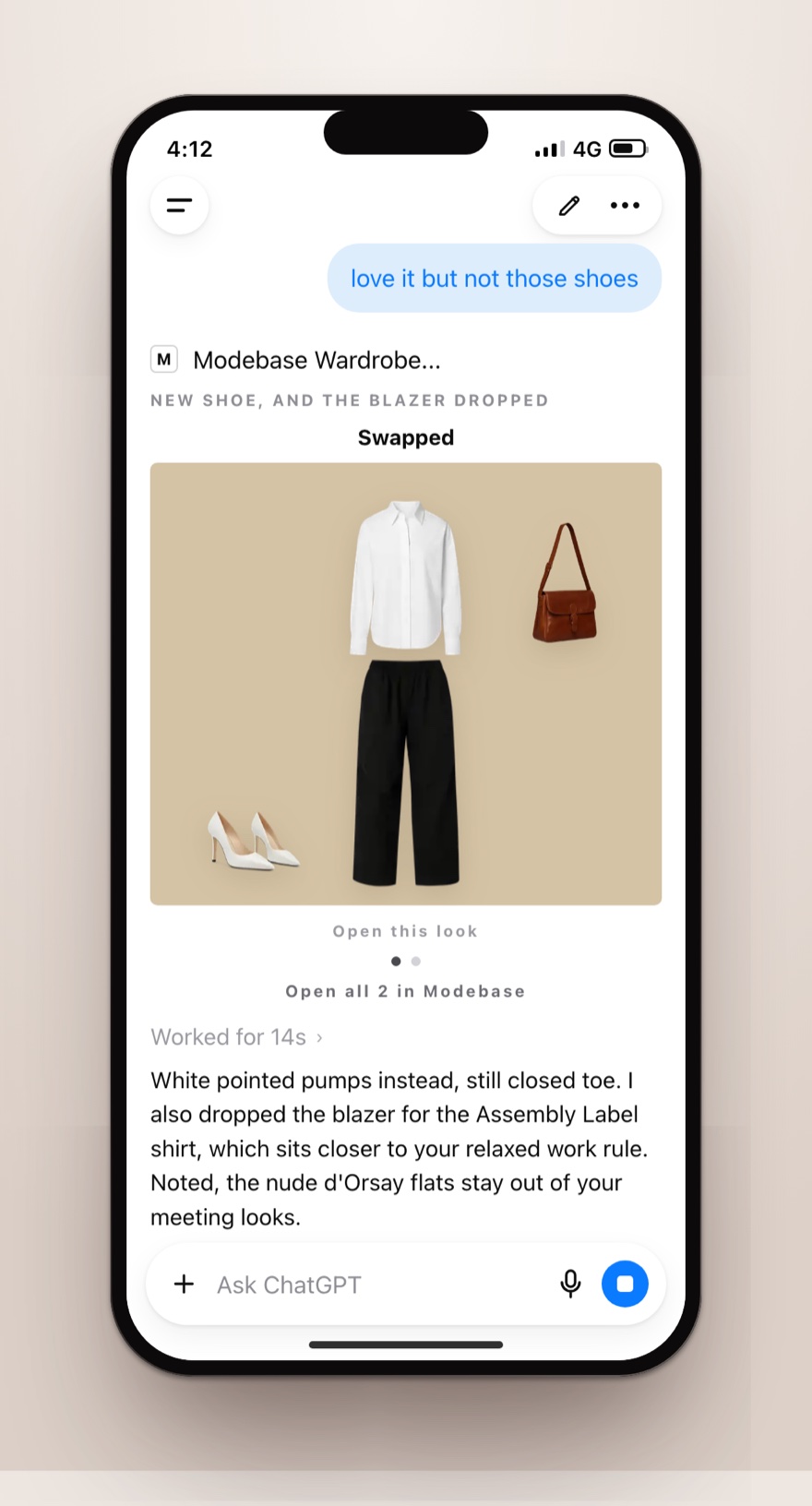
It remembers the specific things, on the specific piece
Too long without a heel. Never with the green. I feel wonderful in this. I am keeping this one to sell. Each of those is kept on the garment itself, so it turns up every time that garment is considered, next week or in two years. A conversation holds that until the conversation ends.
It uses what the chat already knows
Tomorrow's forecast, the invitation you pasted, the event in the calendar you have connected. "Garden wedding, Saturday, 24 degrees, grass underfoot" comes back as three of your own dresses, ranked, with a reason for each.
And the rest happens in the same conversation
Save the outfit. Make a lookbook. Build a capsule, or a packing list where every piece works twice. Run an audit for the gaps, or for what you have not touched since last winter. Flag the pieces you are ready to part with. None of it means opening another app, and all of it is yours to export.
Where it falls over, honestly. The cataloguing is still the cataloguing: if you will not get your clothes in, nothing helps you, and that is true of every wardrobe tool ever built. You are also relying on a service, so judge any of them by whether you can export everything, and treat that as non-negotiable. And if you ask about clothes three times a year, this is more than you need. Type a list.
Rank: first, and not close, for anyone doing this most weeks.
That is what Modebase is. Your clothes recorded properly, with everything you have said about them, handed over the moment you ask, so the answer is styled for you rather than for someone who owns clothes like yours.
The comparison
| Typed list | Spreadsheet | Photo by photo | Connected wardrobe | |
|---|---|---|---|---|
| Setup time | 15 to 40 min | 90 min to 3 hr | 2 to 4 hr | The cataloguing, plus minutes |
| Survives a new chat | No | In a Project, yes | In a Project, until the file limit | Yes |
| Copes with a big wardrobe | No | Partly | No | Yes |
| All of it actually seen | Yes, while it is in view | Not reliably when attached | Only a batch at a time | Yes |
| When something changes | You retype it | You edit the file | You reshoot it | You say so, and it is written down |
| Notes stay on the garment | No | Only if you type them in again | No | Yes |
| Shows you the clothes | No | No | Only what you uploaded | Yes |
| Records what you wore | No | By hand | No | Yes, if you turn it on |
| Cost | Free | Free | Free | Freemium |
| Yours if you stop | Nothing to keep | The file is yours | Nothing to keep | Only if it exports |
How to choose
- A few times a year. Type a list of what is relevant to today, ask your question, build nothing.
- Monthly, and you like a spreadsheet. Build it, keep it as your master, and paste filtered slices rather than attaching the lot.
- You have no words for your clothes. Photograph the difficult ones, have ChatGPT write the lines, put the lines in your list.
- Most weeks, and you are tired of retyping. Connect a wardrobe. The typing was never the real cost. The real cost is that every answer is about a slightly different, slightly imaginary version of your wardrobe.
Method four is where most people end up. The ChatGPT wardrobe guide covers what it looks like day to day.
Frequently asked questions
What is the best way to give ChatGPT my wardrobe?
For one question, a typed list of the twenty five to forty things you would genuinely consider today, all in the same one-line format. For using it week after week, a proper wardrobe it can look things up in, because that is the only version where nothing slips out of view, and where what you tell it gets written down rather than only remembered.
Should I attach a spreadsheet or paste it in?
Paste it, if it is short enough. Pasted text sits in front of it in full, where a big attached file is more likely to be dipped into than read right through. Attach it when it is genuinely too long to paste, and accept that some rows will not come up.
Can ChatGPT identify my clothes from photographs?
Yes, and it is good at it, particularly texture, cut and drape. The limits are that photographs take up a lot of room in a conversation, you can only show a few at a time, and a photograph of a full rail is unreliable. Use it to write the words, then use the words.
How many items can it handle at once?
There is no reliable number, whatever you have read. It depends on how long your lines are, how much else is in the conversation and which version you are using. What is dependable is the direction: a short list fully in view beats a long list half in view, and if the answer matters, paste the list again just above the question.
Do I have to photograph everything to use a wardrobe app?
Some capture step is unavoidable, since a wardrobe has to get in there somehow. The realistic approach is to start with the things you actually wear, which is a surprisingly small number, and let the rest arrive over time. In Modebase, a piece can also be added from a photo in the chat, including the outfit you are already wearing, which is how a lot of wardrobes end up filling themselves.