Add Modebase to ChatGPT or Claude

Connect once and your assistant styles you from the clothes you actually own. Setup takes about two minutes.

ChatGPT

Opens ChatGPT with the setup prompt ready. Add Modebase from Plugins, on any plan, on the web or in the app.

Open ChatGPT

Claude

Opens Claude with the setup prompt ready. Adds Modebase as a custom connector, on a Pro, Max or Team plan.

Open Claude

Using another assistant?

Set it up by hand, or having trouble?

In Claude you add Modebase as a custom connector by URL, then sign in and approve.
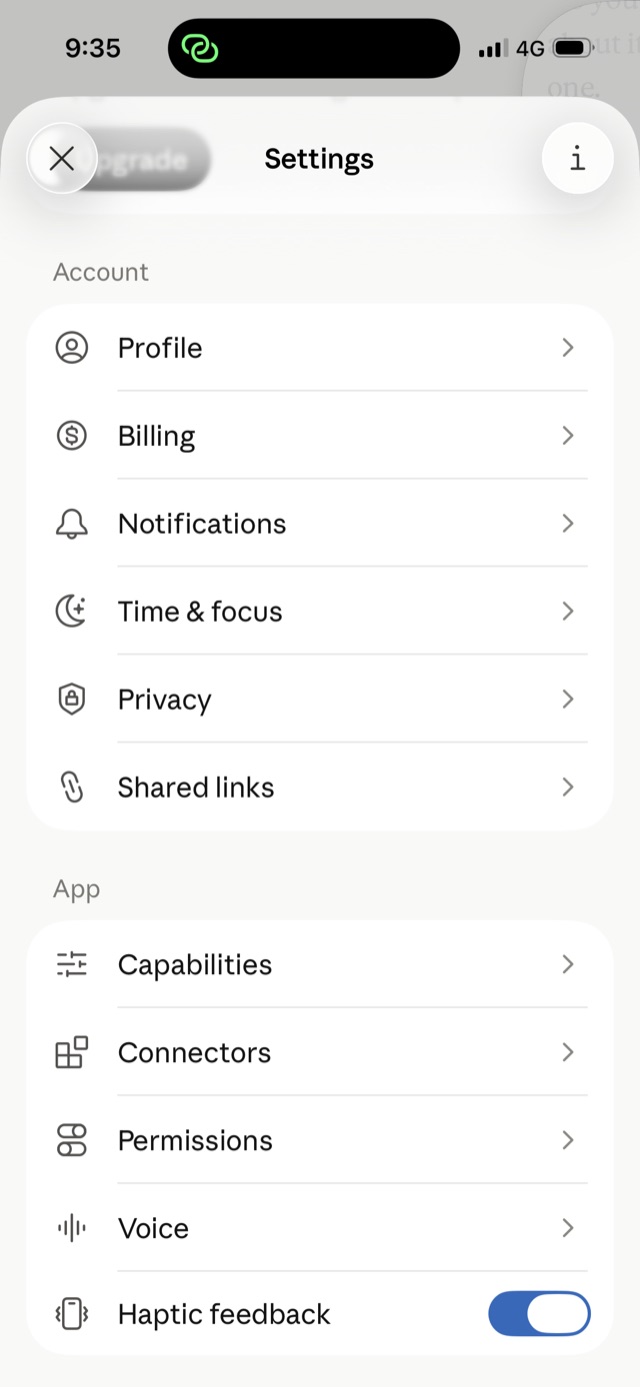
Step 1: In Settings, tap Connectors.

Step 1 of 8

In Settings, tap Connectors.

Read the steps instead
  1. In Claude on the web, open Settings, then Connectors.
  2. Choose Add custom connector, paste the connector URL below, then continue.
  3. Sign in through the popup and approve read AND write. Writing is how it logs what you wear, saves outfits, and remembers your preferences. It confirms before it saves anything.
  4. Modebase is connected. Build your wardrobe on the Modebase site: open your catalogue, tap Add, and upload photos of your clothes — a plain shot, a mirror selfie, or an outfit photo — and Modebase catalogues each piece for you.
  5. Once your pieces are in, come back to the chat and ask what to wear, what to pack, or how to style a piece.
  6. Tell it your style as you go — a colour you love, a pairing you don’t, a piece that feels tight. Say “save that to Modebase” and it keeps the note on your real pieces, so it sticks across the app and every device — not just this chat.
Use a personal Claude account. Team and Enterprise workspaces can block custom connectors, so the tools may not respond. A personal Pro or Max account works.

Connector URL

https://www.modebase.co/api/mcp

Can’t connect?

Don’t see “Add custom connector”?
Custom connectors need a paid Claude plan (Pro, Max, Team or Enterprise) and are added on the web at Settings, then Connectors.
The outfit came back as a link, not an image?
Outfits should appear in the chat as your actual pieces. If you only get a link, your connector is on an older version: remove it and add it again, and the card comes back. Either way the link still works, and it opens the look in Modebase where you can tweak it, save it and share it.
It keeps asking permission every time?
Approve read and write when Claude asks. It still records only what you ask it to — it confirms before it saves anything.
On a Team or Enterprise workspace?
An admin can restrict custom connectors. If you can’t add one, use a personal Pro or Max account instead.
Nothing happens when you add it?
Check the Server URL is exactly https://www.modebase.co/api/mcp, then remove the connector and add it again so Claude re-reads it.

Still stuck? Email support@modebase.coand we’ll get you set up.